Living Room Redesign
Last updated
AI Living Room Redesign from Your Photo
AI Room Styler is an AI living room designer that redesigns your actual living room from a photo. Upload the room, choose a style, and get a photorealistic redesign that keeps your walls, windows and layout.
Upload a photo of your living room and explore photorealistic redesign options in seconds. Scandinavian, Modern, Japandi, and 46 styles in total. Works in your phone's browser, straight from the camera.
Drop a photo of your room here
First 3 designs free with Google · No credit card
From $9.99 for 20 designs · No subscription
- Your layout is kept: walls, windows and doors stay where they are unless you ask for a new one. What the AI keeps and what it changes
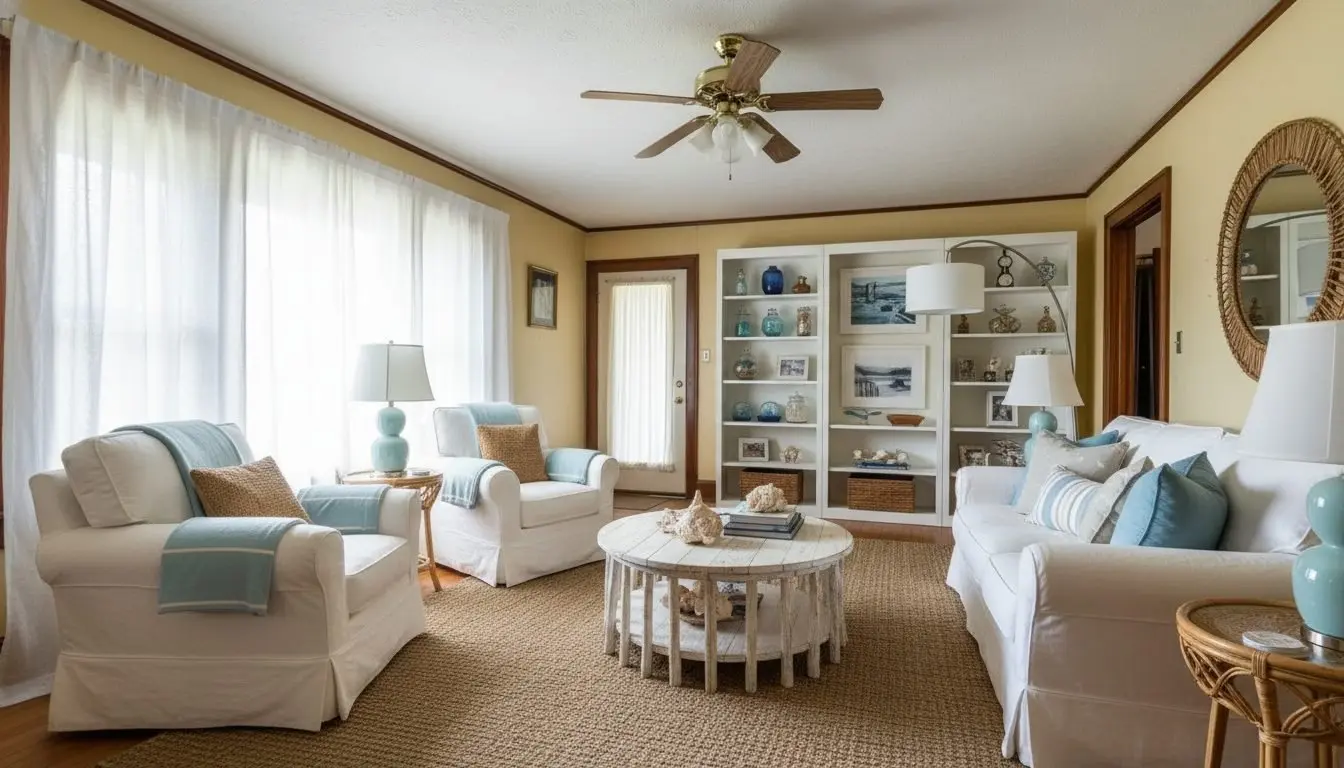
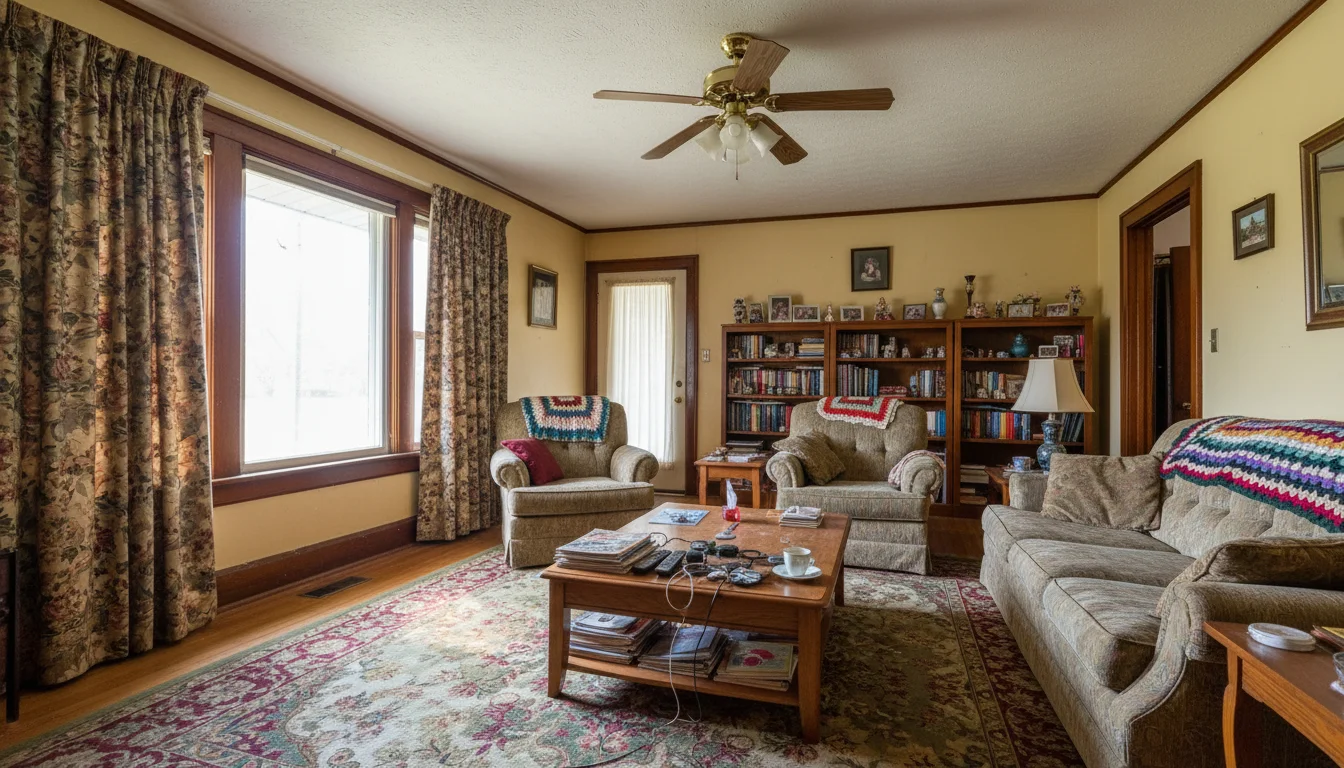
Drag to compare · Redesigned in Coastal style in 30 seconds
AI living room redesign, at a glance
- What you upload
- One photo of your living room, as a JPG, PNG or WebP file.
- Styles
- 46 styles, including Scandinavian, Modern, Japandi and Coastal, or describe your own.
- Time per design
- About 30 seconds.
- What stays
- Walls, windows, and doors; ceiling height; room layout and proportions; camera angle, perspective, and crop. A new window or door is added only if you ask for one.
- What changes
- Furniture and decor; furnishing materials and finishes; wall color and flooring, when you ask for it; lighting and time of day.
- Free
- First 3 designs free with Google, no credit card.
- Paid
- From $9.99 for 20 designs. No subscription.
- What you get
- A photorealistic image to download, with no watermark.
- What it does not do
- It shows a style direction. It does not produce floor plans or furniture dimensions, so measure before you buy.
Styles
Living room interior design styles to try
46 styles available. Generate multiple directions from the same photo and compare side by side.
Scandinavian
Clean lines, natural materials, warm neutrals.
Modern Minimalist
Stripped-back, functional, high contrast.
Japandi
Japanese simplicity meets Scandinavian warmth.
Industrial Loft
Exposed materials, raw textures, urban edge.
Contemporary
Current, versatile, balanced proportions.
Coastal
Light, breezy, natural palette and textures.
Bohemian
Layered textiles, warm tones, global influences.
Art Deco
Bold geometry, metallic accents, luxe finishes.
Plus custom prompts for any look you can describe.
What it is
What is AI living room redesign?
AI living room redesign takes a photo of your existing space and generates photorealistic alternatives showing how it would look in a completely different style. The AI keeps your room's architecture intact (walls, windows, ceiling, and proportions) and replaces the furniture, textiles, wall color, and decorative elements with style-matched alternatives.
This is fundamentally different from mood boards or Pinterest inspiration. Instead of showing you rooms that look nothing like yours, AI redesign works directly from your photo. The proportions are yours. The natural light is yours. The result shows what your actual room would look like, not a showroom approximation of it.
A living room ties together a lot of interconnected purchases: sofas, coffee tables, rugs, lighting, shelving, and wall treatments. Settling the style direction before you buy any of them is what keeps a piece from arriving and looking nothing like it did in the store.
Interior designers also use it to show clients multiple style directions before any design work begins, aligning on a vision before supplier quotes are requested. Real estate agents use it to help buyers visualize dated listings in a more current style.
What it changes
What changes in your living room, and what stays
The structural half is what every prompt is built around. A request that would move a wall, widen the room, or re-frame the shot is flagged before you spend a credit, and the render is told to hold the living room you photographed: its walls, its windows, and its framing, as shot.
Designed to preserve
- Walls, windows, and doors
- Ceiling height
- Room layout and proportions
- Camera angle, perspective, and crop
Free to change
- Furniture and decor
- Furnishing materials and finishes
- Wall color and flooring, when you ask for it
- Lighting and time of day
Choose how much changes
Just restyle
Changes: New furniture, lighting, rugs, curtains and decor, each in the same spot, and the clutter cleared.
Keeps: Your layout, walls, windows, doors and built-ins. In kitchens and baths, built-ins stay where they are but may be refinished.
Restyle and rearrange
Changes: New furniture, lighting, rugs, curtains and decor, and where they sit, with the clutter cleared.
Keeps: Your walls, windows, doors and built-ins. In kitchens and baths, built-ins stay where they are but may be refinished.
Redesign from scratch
Changes: Everything above, and it may rework the fireplace, panelling and built-ins, and refinish the ceiling. It adds a window or door only if you ask for one.
Keeps: Your room size, ceiling shape, and every window and door you already have.
To keep a piece you love, name it in your note, such as "keep my sofa". The AI usually keeps it, but check each result, since a generative model can still change it. To keep all your furniture and change only the walls or the floor, use Change wall or Change floor, which touch one surface by design. More in what changes and what stays.
For a living room specifically, that means the sofa, chairs, rug, coffee table, lighting, wall color, and soft furnishings are all in play, while the window that governs where the sofa can go is not. It is why the results stay useful for shopping: the constraints you are actually buying around survive the redesign.
Results
Living room redesign examples
BeforeCoastalCoastal Redesign
Restyle · Light palette, natural textures
Before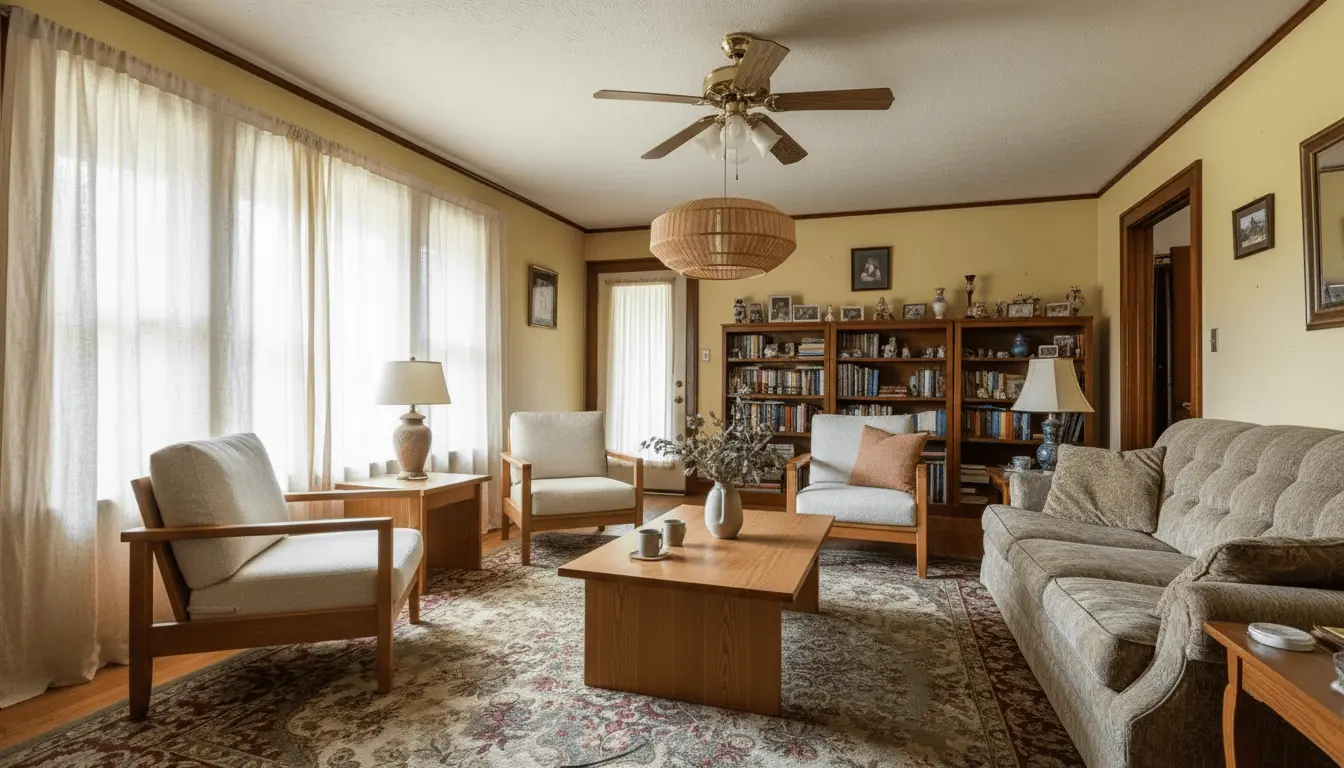 Japandi
Japandi Restyle
Restyle · Minimal forms, warm wood tones
How it works
How AI living room design works in three steps
An AI living room planner that skips the modeling work. Upload a photo and explore makeover ideas in minutes.
Upload your living room photo
A clear smartphone photo with natural light works well. Wide angle preferred.
Choose Redesign and a style
Pick from 46 styles or write a custom prompt describing the look you want.
Compare and download
Review your redesigned room and download the result with no watermark.
Cost comparison
Living room redesign cost: AI vs. hiring an interior designer
Explore your options before committing to a full design engagement. For prices across AI tools, see what AI room design costs.
| Feature | AI Redesign | Interior Designer |
|---|---|---|
| Cost | About $0.12 to $0.50 per design | $100 to $300/hr, 10 to 20 hrs min. |
| Time to first concept | Under 1 minute | 1 to 3 weeks |
| Revisions | Unlimited, instant | Billed by the hour |
| Based on your actual room | Yes, from your photo | Mood board or 3D mockup |
| Commitment required | None | Engagement contract |
| Styles to explore | 46, switchable instantly | One direction at a time |
Before you buy
What to test before you spend on furniture
Seeing the room settles the look. These settle whether the piece actually fits.
Sofa scale
Compare a low sectional against a tighter three-seater in the same room, then check the footprint against your wall.
Sofa fit calculatorRug size
A rug that stops short makes a room look smaller. Test the look, then size it against your seating.
Rug size calculatorThe TV wall
See the wall styled around the screen rather than dominated by it, then check the diagonal for your seating distance.
TV size calculatorWalkways and clearance
A layout can look right and still leave nowhere to walk. Confirm the paths before you commit to an arrangement.
Furniture spacing calculatorCoffee table proportion
Test the table against the sofa you are actually considering, not the one in the inspiration photo.
Coffee table size calculatorWall color direction
Try warm, cool, and neutral walls behind the same furniture before you buy a single sample pot.
Palette generatorIs it for you
When to use this on a living room
A living room is a sequence of expensive, interdependent purchases. This is for deciding what they should look like together, not for working out whether they physically fit.
A good fit for
Choosing a sofa direction
See a shape, colour, and fabric in your own room and light before the delivery slot is booked.
Testing a wall colour
Compare warm, cool, and neutral behind the same furniture without buying a single sample pot.
Committing to a style
Put Scandinavian, Japandi, and Coastal side by side on the same photo instead of guessing from Pinterest.
Showing a client or a partner
A picture of your actual room ends an argument that mood boards tend to prolong.
Not the right tool for
Whether the sofa fits
Nothing here is measured. Use the sizing calculators on this page and a tape measure for that.
Rearranging the room
Restyle and rearrange moves things where the new scheme suits them, and Just restyle leaves every piece where it stands. Either way nothing here is measured, so treat a new arrangement as a suggestion rather than a floor plan.
Knocking through or extending
Structural change is an engineering question. Ask for one and we say so before the credit is spent.
Ordering an exact piece
A rendered chair is a look to search for, not a product with a SKU behind it.
The right order is usually visual first, dimensional second. Settle whether the room is warm or cool, light or heavy, then reach for a tape measure and the calculators above to check the sofa you picked actually clears the walkway.
Features for this job
- Restyle a Room. Use when a furnished room needs a new overall design direction.
- Change Wall Color. Use when only the wall treatment should change.
- Change Flooring. Use when only the floor should change and the rest of the room should stay fixed.
- Match an Inspiration Photo. Use when you have a visual reference but do not know the style name.
Not quite the job you have?
- Redesigning a bedroom, office, dining room, or bathroom: AI room design from a photo
- Choosing cabinets, worktops, or a backsplash: AI kitchen design
- Furnishing an empty living room for a listing: AI virtual staging
FAQ
Living room redesign questions
Common questions about AI-powered living room redesign.
Judge one on four things. It should work from a photo of your actual room rather than a template, hold the architecture and proportions steady so the result is something you can shop against, offer enough styles to compare directions properly, and return a file you can download with no watermark on it. AI Room Styler does all four: upload a living room photo, pick from 46 styles or describe your own, and get a photorealistic result in about 30 seconds.
Yes. Upload a clear photo of your living room and the AI generates photorealistic redesigns based on the style you choose. It keeps your walls, windows, and proportions intact while replacing the furniture, the decor, and the materials they are made of. Whether each piece stays where it stands or gets rearranged is yours to choose. Wall color and flooring change when you ask for them.
Both. Restyle replaces your furniture with new pieces in the style you pick, and "Just restyle" puts each new piece where the old one stood. To keep a piece you love, add a note such as "keep my sofa". To change only one thing, use Edit a detail and the rest of the room stays as photographed. To start fresh, run Declutter to empty the room, then furnish it.
No app to install. AI Room Styler runs in your phone's browser: take a photo of the room with your camera or pick one from your gallery, and the redesign comes back in about 30 seconds.
Yes, a one-click Google sign-in. It keeps the free designs for real people rather than bots. Your designs stay in your account for 30 days, so you can come back and keep refining the same room, and only you can see them unless you share a link.
Your walls and the size of the room stay put whichever setting you use. How much else changes is a choice of three. "Just restyle" swaps the furniture, lighting, rugs, curtains and decor and leaves each piece where it stands. "Restyle and rearrange" does that and moves things where the new scheme suits it; this is the default. "Redesign from scratch" goes furthest and may also rework the fireplace, panelling and built-ins. Only the third one touches architecture, and even that one keeps every window and door you already have, adds one only if your note asks for it, and never changes the room's proportions. All three repaint or refloor only where your note asks for it.
Results are photorealistic. Lighting adapts to your original photo, furniture is generated at a visually plausible scale for the space, and materials look like real photography. The quality suits client presentations, social media, and shopping references. It is a visual direction rather than a measured plan, so confirm fit and clearance before ordering.
46 styles are available, including Japandi, Scandinavian, Modern, Luxury Modern, Minimalist, Industrial Loft, Coastal, Boho Chic, and Art Deco. You can also write a custom prompt to describe a specific look.
Yes. Interior designers regularly use AI Room Styler to present multiple design directions to clients before committing to a supplier or material. You can generate several style variations from the same photo in minutes.
Yes. The AI adapts to the dimensions and proportions it reads from your photo, including small rooms, narrow layouts, and unusual angles. Smaller rooms often produce particularly clean results because the composition is tighter.
Restyle replaces visible furniture and decor with style-matched alternatives. For the cleanest result in a furnished room, run Declutter first to clear the scene, then restyle the empty room.
Credits come in one-time packs starting at $9.99 for 20 designs, and they never expire, so it stays practical for a single room or an ongoing project.
Yes. You can run the same photo through as many styles as you want. This makes it easy to compare Scandinavian, Japandi, Coastal, and other directions side by side before committing to any purchases.
It works with lower-light photos, but natural daylight produces the sharpest, most realistic results. Shoot during the day with overhead lights on and blinds or curtains open for best output.
Yes, and this is one of the most common use cases. Generate redesigns in several styles, compare the results, and use them as a reference when shopping. This reduces the risk of purchases that look wrong in your specific space.
Shoot from a corner or doorway to capture as much of the room as possible. Use natural daylight with lights on. Avoid fisheye lenses and heavy HDR processing. A clear, evenly lit photo at eye level works best.
No. There is nothing to cancel: credits are sold as one-time packs instead. You can settle the living room now and come back to the rest of the house months later without paying twice.
Yes, and no attribution is required. The output is yours to use for any lawful purpose, including client presentations, proposals, and marketing, whether the design came from your free designs or from credits you purchased. Downloads are high resolution, so a render holds up in a printed board as well as on screen.
More AI design tools
See your living room transformed
Upload a photo and explore redesign options in seconds. No design experience needed.
Redesign My Living Room