Feature
Last updated
Add furniture to an empty room from one photo
AI Room Styler is an AI virtual staging tool that furnishes an empty room from one photo. Upload the empty room, choose a style, and get the same room furnished and photorealistic in about 30 seconds. If the room is still furnished, clear it first, then stage it.
An empty room gives a buyer nothing to picture. Upload the photo, choose a style, and get the space furnished with scaled, photorealistic pieces in about 30 seconds.
Furnish an empty roomFirst 3 designs free with Google · No credit card
From $9.99 for 20 designs · No subscription
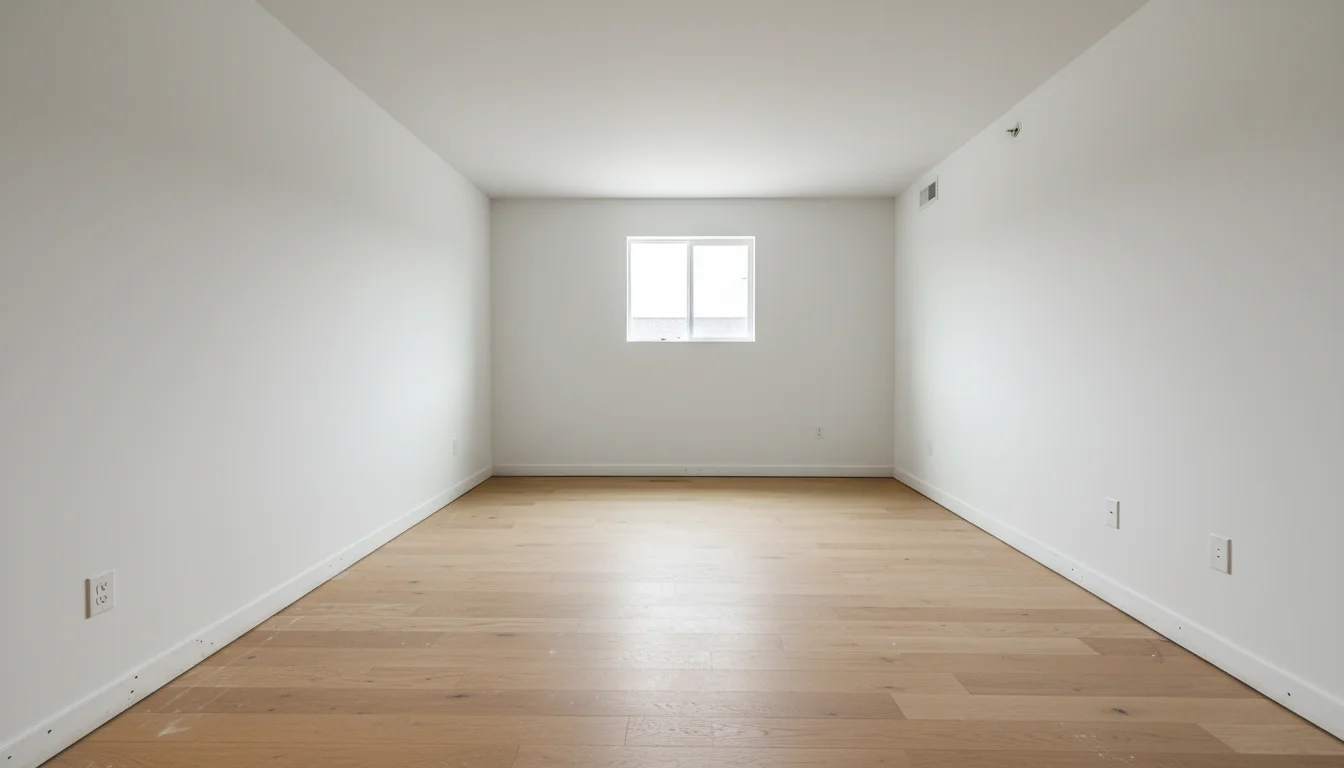
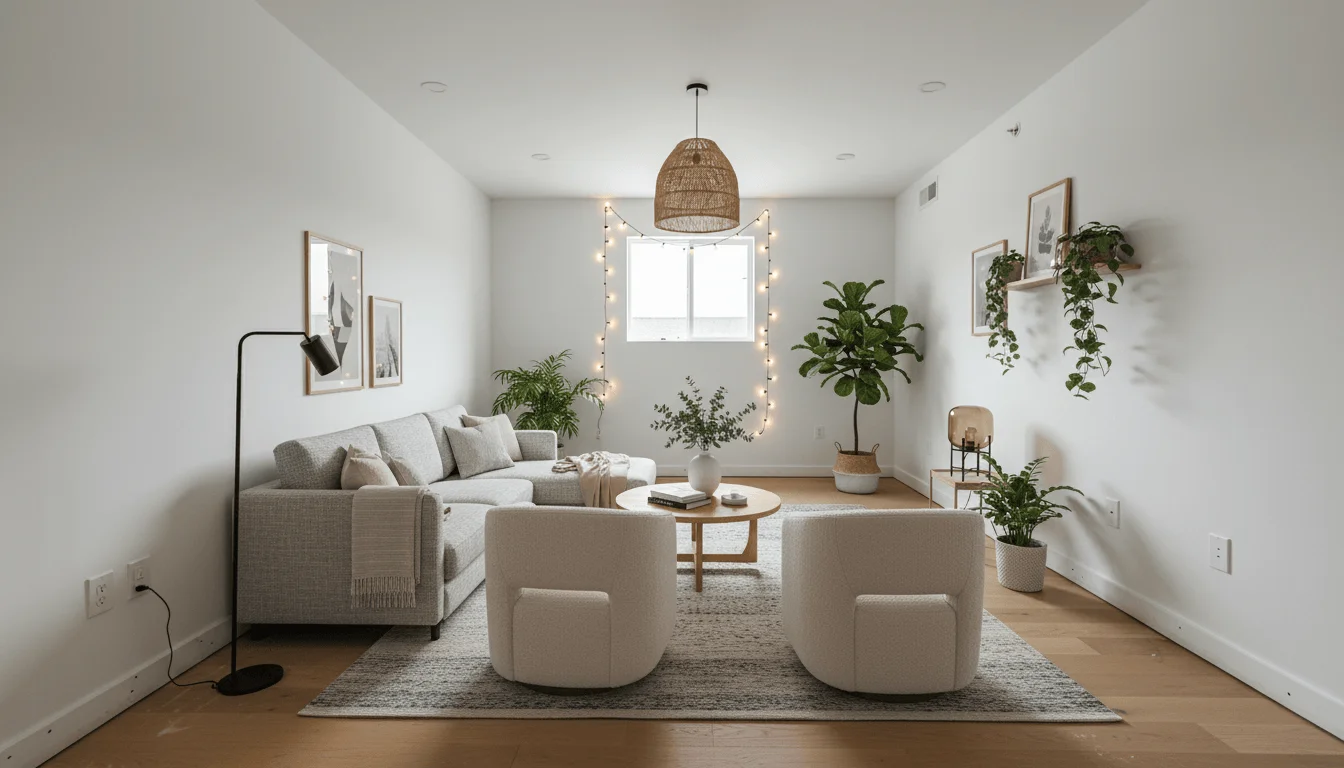
30 seconds
from empty photo to furnished room
46 styles
match the furniture to the buyer
No 3D model
no floor plan, no crew, no rental
Furnishing an empty room used to mean one of two things: renting real furniture and booking a crew, or building the room in 3D software and placing models by hand. Both take days and both cost real money before you know whether the result is any good. Adding furniture from the photo skips all of it. The AI reads the room's geometry, the direction the light is coming from, the floor material, and the ceiling height, then places furniture that sits at the right scale on the right surfaces. The walls, windows, and proportions stay as photographed, so what you get back is the real room furnished rather than a generic showroom that happens to look nice.
What this feature does
- Input
- A clear photograph of an empty room.
- What changes
- Adds AI-selected furniture and decor in the room type, density, and style you request.
- What stays
- The photographed room architecture, flooring, camera position, and ambient light.
- Use another feature when
- Use Place Your Own Furniture for one specific product, and measurements for physical fit.
How to judge an AI-staged room
- Walls, windows, floors, and room proportions still match the source photograph.
- Furniture looks plausible in relation to doors, windows, and familiar room features.
- Legs meet the floor and contact shadows agree with the existing light.
- Doors and main traffic paths remain usable.
- The room function and furnishing density suit the people who will use it.
How does AI add furniture to an empty room?
Adding furniture to an empty room means handing the model one photo of a bare space and getting the same space back furnished. The room itself is not rebuilt. The model reads the geometry out of that single image: where the floor plane sits, how far the far wall is, which direction the light is coming from, roughly how high the ceiling is. It then draws furniture standing on that floor, at a size the room would actually accept.
The difference between this and pasting a sofa into a photo is perspective. A fixed-size object dropped into an image reads as a sticker: the legs float, the back edge is the wrong length, and the shadow falls in a direction nothing else in the room agrees with. Getting it right means inferring where the camera stood and drawing each piece as it would look from there, with contact shadows where it meets the floor. Interiors are a harder case than general object insertion for exactly this reason.
The established alternatives are renting real furniture and booking a crew, or modelling the room in 3D and placing catalogue pieces by hand. Both give excellent results and both take days, which is why they get reserved for properties that justify the spend. Working from the photo brings a furnished version of the room down to the time it takes to upload it, which turns it from a decision into a default.
Furnishing a room, or staging a listing?
They are the same generation with different obligations attached. Furnishing is the capability: an empty room goes in, a furnished room comes out. Virtual staging is that capability pointed at property marketing, where the image becomes an advertisement and rules start to apply to it.
If buyers are going to see the image, the staging workflow is the one you want. Most MLS rules require a digitally staged photo to be labelled as such, and none of them let you alter permanent features: you cannot rebuild a kitchen, remove a wall, or paint over a defect and call it staging. The virtual staging page covers the disclosure practice and the per-listing economics in full.
If the image is for your own decisions, none of that applies. Someone working out whether their new flat will take a three-seater, a landlord costing up what to furnish a let with, or an owner deciding which room to spend on first is not advertising anything, and the render is theirs to use however they like.
Where adding furniture struggles
The model infers the room's dimensions from one image, so anything that makes those dimensions ambiguous degrades the result. A shot taken from the doorway down the length of a narrow room gives it very little floor to read, and the furniture that comes back is often too large for the space. Standing with your back to the longest wall, in daylight, with both the floor and the ceiling line in frame, prevents most scale problems before they happen.
Furniture is placed to look right in the frame, not to satisfy a floor plan. It will occasionally put a chair where a door swings, a sofa across a radiator, or a sideboard against the only wall with sockets. None of that shows up as an error in the image, which is precisely why it is worth checking the render against what you know about the room before you let it drive a buying decision.
Mirrors, glazed doors, and television screens are the usual giveaways: a mirror that reflected an empty room will often go on reflecting it after the room is furnished. Generate two or three versions, look at the floor contact under each piece, check the reflections, and keep the one that holds together. The habit costs a minute and catches nearly everything.
Deciding what the room is for
An empty room does not declare its purpose. The same four square metres can come back as a single bedroom, a study, a nursery, or a dressing room, and nothing in the photograph tells the model which of those you meant. Choosing is the most consequential decision on this page and it is the one most people skip: they pick a style, accept whatever function the model assumed, and get back a bedroom nobody asked for.
In property marketing that choice is also a claim. Furnishing a box room as a bedroom tells a buyer the house sleeps four. Furnishing the same room as a study tells them it sleeps three and works from home. Both can be defensible and neither is neutral, and the test that settles it is whether real furniture at that size would actually fit: if a double bed only goes in with the door blocked, the room is not a double bedroom whatever the render shows.
Practically, name the function before the style. A home office with a desk facing the window, furnished Scandinavian gives the model a purpose and an aesthetic, and produces something far more specific than a style name on its own. Running the same photo twice as two different functions is a legitimate way to present a genuinely ambiguous room, as long as each version is labelled for what it is rather than left to imply both at once.
Try it yourself. First 3 designs free with Google · No credit card
Furnish an empty roomWhy add furniture to an empty room works
Give buyers something to picture
Empty rooms photograph cold and read smaller than they are. Furniture gives the space a sense of scale and shows what the room is actually for.
Furniture that reads at room scale
The AI uses perspective and familiar room features to place pieces at a visually plausible scale, with contact shadows that make them read as part of the room rather than stickers on top of it.
Style it for the buyer you want
Run the same empty room in several styles and lead with the one that matches the people most likely to make an offer.
The room stays the real room
Walls, windows, flooring, and natural light are preserved from the photo. Only the furnishing is generated.
Cheaper than renting furniture
Physical staging runs into the thousands per property before delivery and removal. This is a few dollars a room with nothing to schedule.
Pairs with furniture removal
If the room is occupied rather than empty, clear it first and then furnish it fresh. The two features are the same job in two steps.
How it works
- 1
Upload the empty room
Any clear smartphone photo works. A wide shot in daylight gives the AI the most of the room to work with.
- 2
Choose a style
Pick the look that suits the space and the buyer, or describe the furnishing you want in plain language.
- 3
Download the furnished room
Get a full-resolution image in about 30 seconds, ready for the listing or the client.
Related tools
Go deeper
Frequently asked questions
Ready to try it on a real room?
Furnish an empty room