AI Room Styler is an AI room design tool for real estate agents. Upload a listing photo and show the seller their own room restyled, emptied or staged, with the walls, windows and layout kept as they are. Each staged photo costs about $0.12 to $0.50, depending on the pack. Downloads carry no watermark, including the free designs, so the images can go straight into a listing, and this page covers MLS disclosure.
Win the listing before you market it. Show a seller what their home could look like, agree on a realistic price, and walk into the pitch with the vision already on screen. All from a single photo.
Restyled from one listing photo in about 30 seconds
30 seconds
from listing photo to restyled render
Every room
living, bedroom, kitchen, and more
No design skills
no 3D software or renderer needed
Great agents sell a vision, and the hardest room to sell it in is the listing presentation. A seller who cannot picture their dated living room updated will argue for a price the market will not pay. Showing them their own room restyled changes that conversation: you align on condition, on the updates worth making, and on price, before the home ever goes live. Once the mandate is yours, the same photo-based workflow helps you plan the pre-listing refresh and decide which rooms deserve budget. If the listing is vacant and you need the photos furnished, that is a separate job with its own workflow, pricing, and disclosure rules.
Why real estate agents use it
Win the listing pitch
Show sellers a restyled preview of their own rooms in your listing presentation to stand out from the other agents competing for the deal.
Show sellers the upside
Preview a dated room restyled, or a simple update that lifts the price, so a seller can picture the home at its best before they list. It is the fastest way to align on price and win the mandate.
Have the hard price conversation
A render of the room as-is next to the room updated makes the condition discount concrete, so the pricing conversation stops being an argument about taste.
Plan the pre-listing refresh
Preview paint, flooring, and furniture changes before the seller spends, so the budget goes to the updates that actually move the photos.
Refresh dated interiors
Empty or declutter a tired, cluttered room first, then restyle it fresh, so older interiors photograph like new.
Staging vacant listings
Empty rooms are a different job with their own pricing and MLS disclosure rules. The virtual staging software page covers that workflow end to end.
One room, three levels of work, three different prices
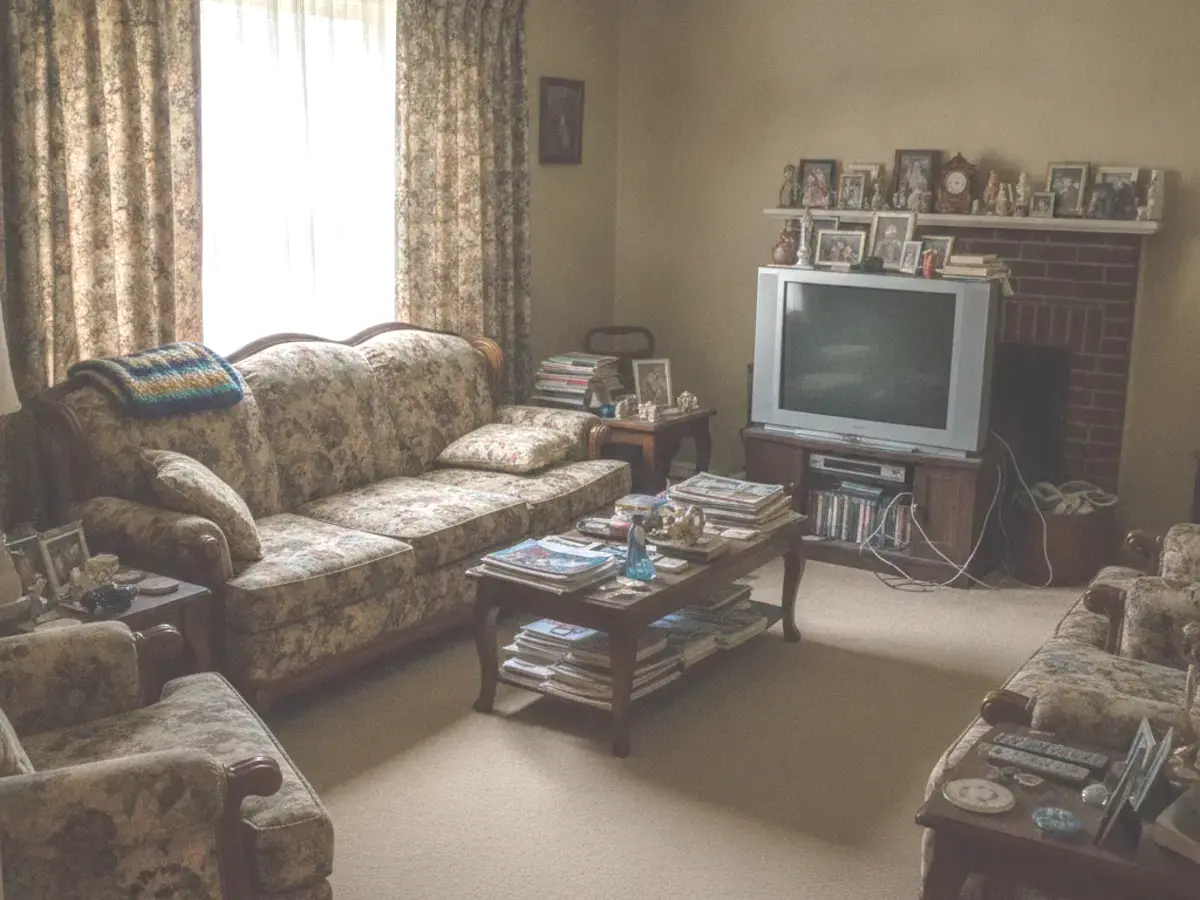
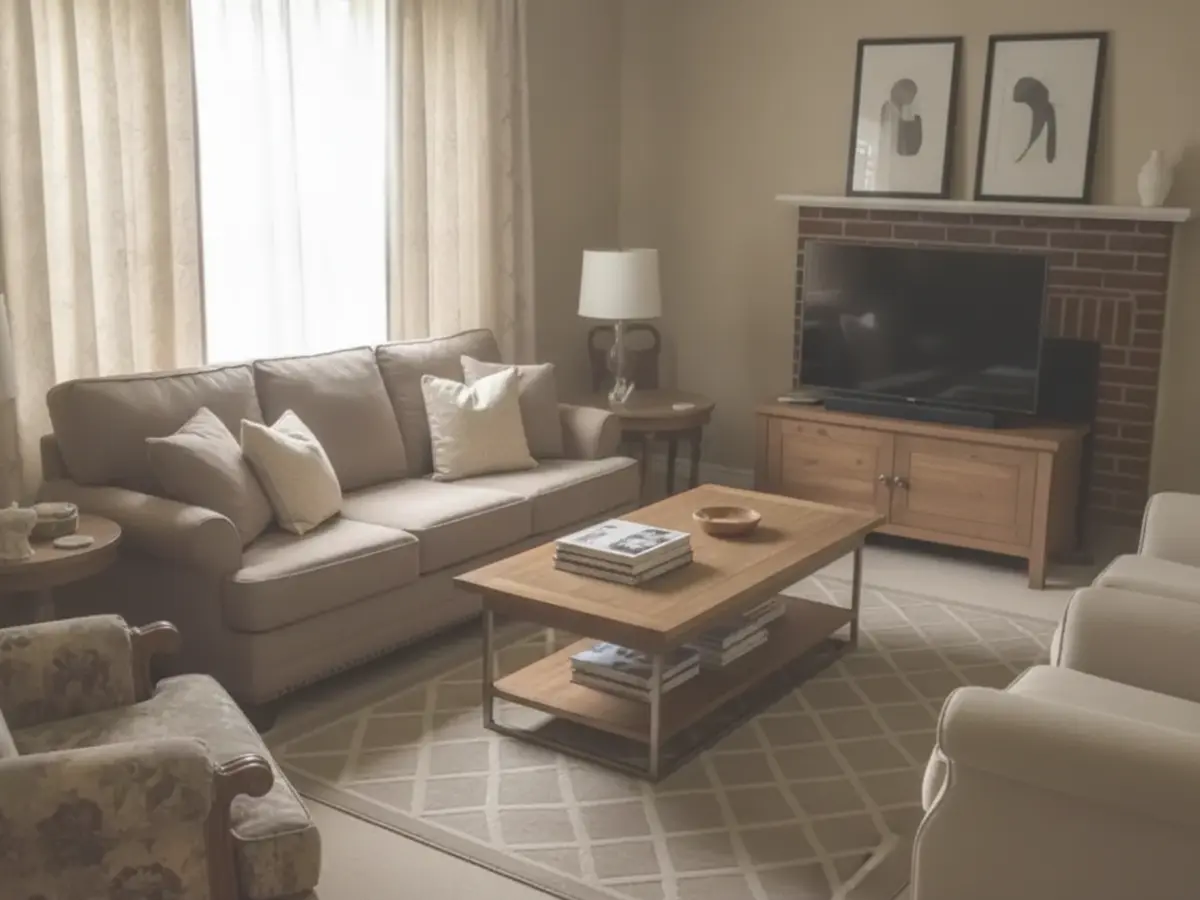
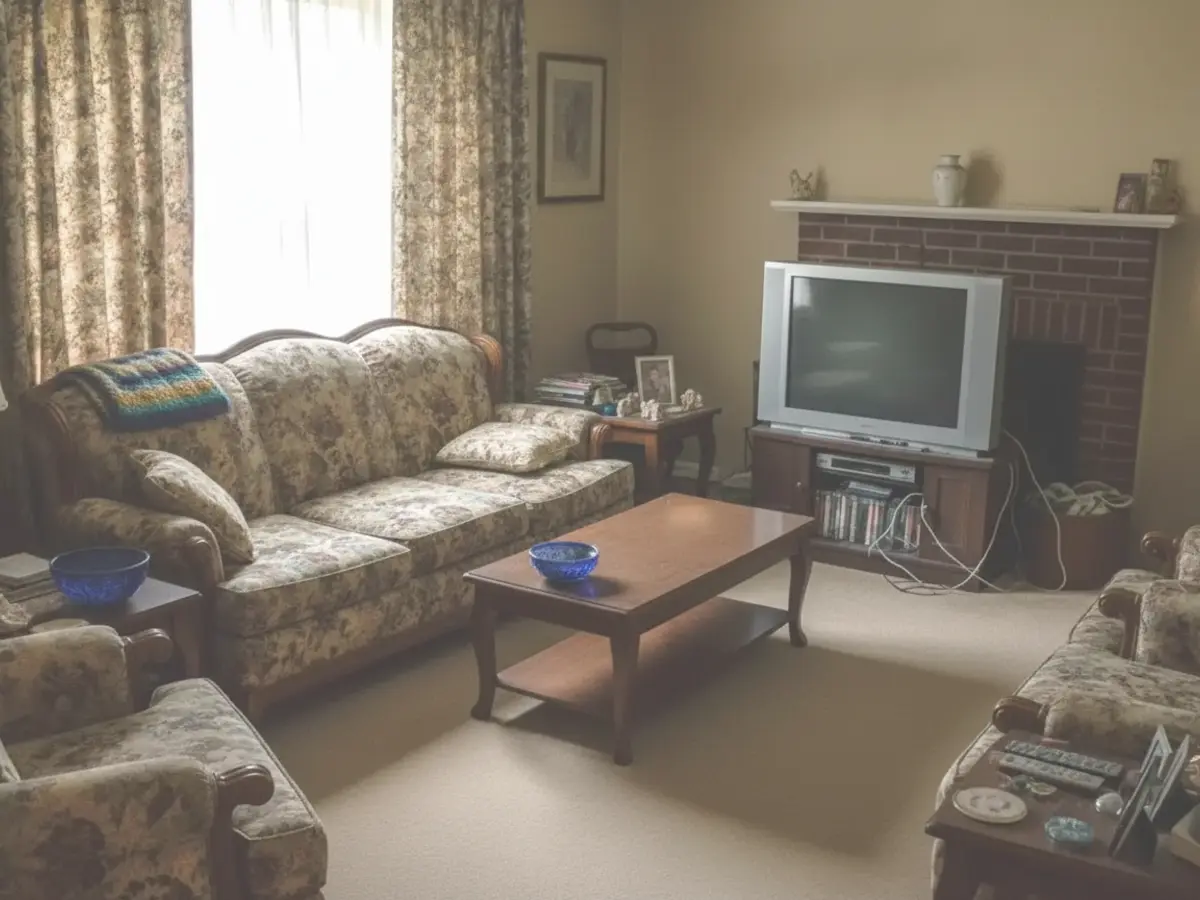
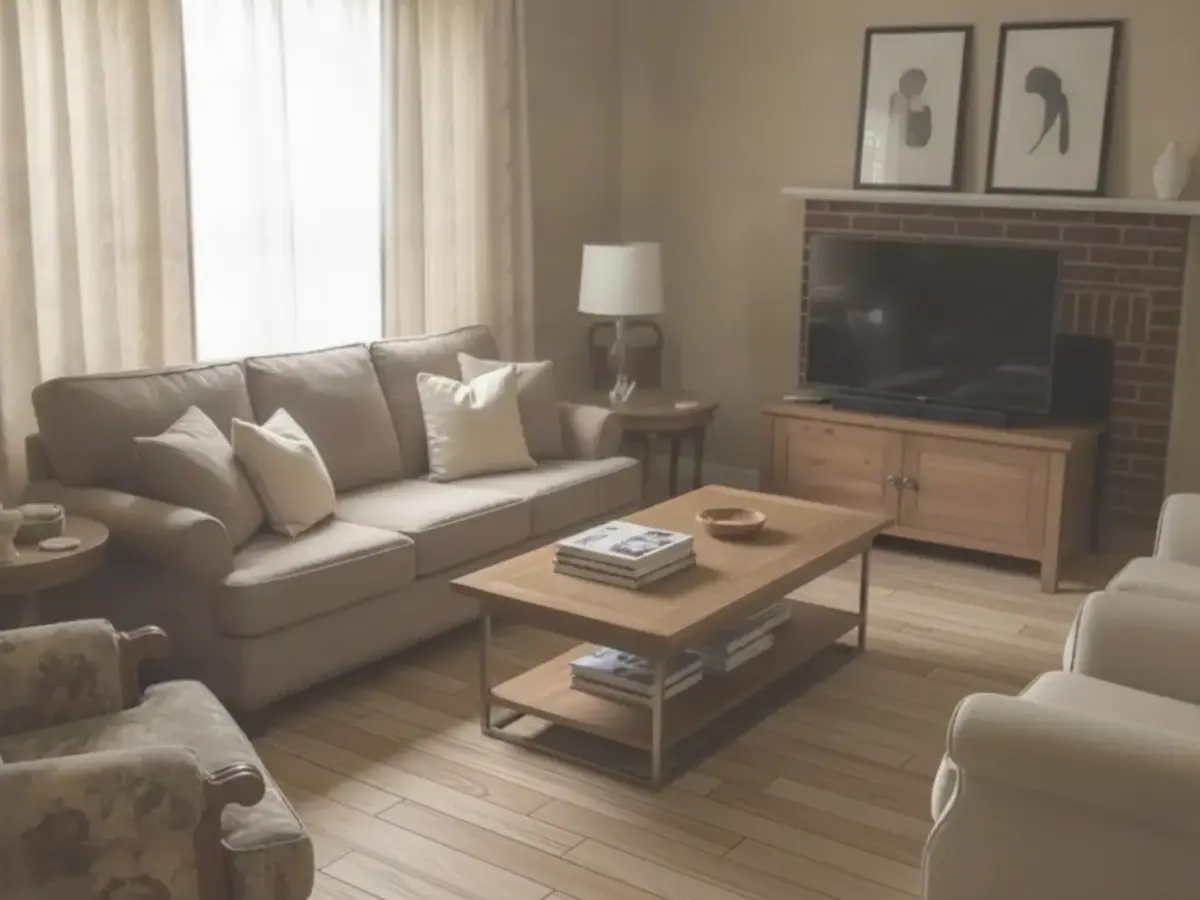
An agent does not sell style variety, they sell a pricing conversation. Each image below is the same seller's living room with more work done to it, so you can show what a weekend of tidying buys, what the furniture budget buys, and what replacing the floor buys, before anyone spends a dollar.
The room
The seller's actual starting point: dated, cluttered, and lived in.
Decluttered: a weekend
Restyled: the furniture budget
New flooring: the big spend
How it works
1
Upload the listing photo
Drop in a photo of the dated or tired room, straight from the walkthrough or the seller.
2
Pick the direction
Choose the look the market rewards at this price point, and let the AI restyle the room while keeping its real layout.
3
Bring it to the pitch
Show the seller their own room at its best, agree on the updates worth making, and set a price you can both defend.
Restyled preview vs a traditional pre-listing consult
AI restyle from a photo
Designer or contractor consult
Cost per room
About $0.12 to $0.50 per design
$150 to $500+ per consult
Turnaround
Under a minute
Days to schedule a walkthrough
What the seller sees
Their own room, restyled
A verbal list or mood board
Trying another direction
Instant and unlimited
A second appointment
Use in a listing pitch
Ready before the meeting
Rarely ready in time
AI Room Styler vs. other AI virtual staging tools
Most virtual staging tools furnish an empty listing photo. They differ in speed, team features, and what they can do with occupied rooms. Here is when each one is the better pick, checked against each vendor's own pages.
AI Room Styler vs Virtual Staging AI
Pick Virtual Staging AI if
Empty-room staging at volume is the only job you need done.
Pick AI Room Styler if
You want staging and restyling of tired, occupied rooms in one tool, plus an ROI calculator to show the seller.
Running a listing presentation around a restyled preview
The preview is not the pitch. It is what lets you have a specific conversation about condition and price instead of a general one about taste. The order you show it in decides whether a seller hears advice or criticism.
Ask for the photos when you confirm the appointment
Three or four wide daylight shots is all you need: the living room, the primary bedroom, the kitchen. Sellers send them happily because it costs them nothing, and it gives you the one thing no competing agent will walk in with.
Shoot them the way the listing needs anyway
Wide daylight frames from a corner or a doorway, lights on, curtains open, phone at chest height so the verticals stay straight. That is what a usable listing photo looks like, and it is also what the AI reads best, so the shots you take for the pitch are the shots the marketing wants later.
Open on the room they are proud of
Leading with the worst room reads as a critique of how someone lives. Start somewhere that only needs a light touch, let the seller confirm the render looks like their home, and the harder rooms land as planning rather than judgement.
Show the room as it stands, not only as it could be
A seller anchored to a number is usually comparing their memory of the house to the listing next door. Two versions of the same room, one as photographed and one updated, make the condition discount visible instead of arguable.
Put a cost band against each version
A version the seller cannot price is a daydream. Attach a range to each one: a weekend of decluttering, a furniture budget, a flooring spend. The Interior Design Cost Estimator gives you defensible ranges to quote without pretending to be a contractor.
Give the do-nothing option a price too
Every pre-listing conversation needs a version where the seller spends nothing, priced accordingly and sitting next to the others. That is what turns the meeting into a decision rather than a wish list, and it is the version some sellers should choose.
Say once that it is a direction, not a quote
Renders are persuasive enough that a seller can hear one as a promise. State plainly that the furniture is representative, that dimensions are inferred from a photo, and that nothing structural is implied. Sellers accept that at the pitch and resent discovering it later.
Where a restyled preview fits in a listing
A restyle is a pitch and planning tool. It earns its keep before the home goes live, in the conversations you have with a seller. It is worth being direct about the jobs it should not be doing.
Reach for it when
You are preparing a listing presentation and want the seller to see their own rooms at their best.
A seller is anchored to a price the condition does not support, and you need the discount to be visible rather than argued.
The seller is deciding whether to spend on paint, flooring, or furniture before listing and wants to see what the money buys.
A dated or cluttered occupied room is holding the photos back, and you want to show what decluttering alone would do.
You are advising which rooms deserve the pre-listing budget and which are already fine.
Use something else when
The room is empty and you need furnished photos. That is virtual staging, with its own per-image pricing and disclosure rules, covered on the virtual staging software page.
The image is going on the MLS. Most MLS rules require altered photos to be labeled, and permanent features must not be changed.
The seller wants a number they can hold you to. A render shows the look, not a contractor quote.
The question is whether a structural change is possible. Moving a wall or opening up a kitchen is an architect or builder question, not a restyle.
The listing needs measured floor plans or a walkthrough tour. Those are separate products.
Ask the seller for a few photos before the meeting, restyle the rooms that are holding the home back, and bring the before and after to the pitch. Sellers respond to seeing their own room rather than a generic example, and it separates you from agents who arrive with comps alone.
It makes the condition discount visible. Showing the room as it is next to the room updated turns an abstract argument about taste into a concrete conversation about what buyers will pay for the home in its current state, and what updating it would take.
Yes. AI Room Styler works from your photo and keeps the room's actual geometry, windows, and proportions, so what you show a seller stays anchored to the home they own rather than an idealized version of it.
Yes. You can declutter or empty a room first, then restyle it fresh, which is useful for dated or cluttered listings where the seller's furniture is the problem.
Prioritize the rooms buyers weigh most heavily: the living room, primary bedroom, and kitchen. These carry the most weight in both the listing photos and the seller's own sense of what the home is worth.
No. Pick a direction and the AI handles furniture selection, layout, and lighting. Generate several options and choose the one that makes the strongest case to the seller.
That is a different job. Furnishing vacant listing photos has its own workflow, per-image economics, and MLS disclosure requirements, all covered on the virtual staging software page along with an ROI calculator for showing sellers the numbers.
Yes. Most MLS rules require you to clearly label altered listing photos and avoid changing permanent features. A restyled preview you show a seller in a pitch is not a listing photo, but anything you publish to the MLS must be disclosed and must not hide defects.
Shoot in daylight with the lights on and the curtains open, stand in a corner or a doorway so the long side of the room faces the camera, and hold the phone at chest height so the verticals stay straight. Declutter and depersonalise before you shoot rather than fixing it afterwards. Those are also the photos the AI reads best, so one round of shooting serves the listing and the restyle.
The ones a buyer reads as neglect rather than as taste: dripping taps, sticking doors, cracked tiles, chipped paint, dead bulbs, and anything that hints at water. Cosmetic spending on flooring and paint is a judgement call rather than a given, and previewing it from a photo is the cheapest way to find out whether the money shows up in the listing photos at all. None of this replaces a survey or an inspection.
Finishes more often than layout: worn carpet, dated kitchen fronts, heavy window treatments, fittings that fight the rest of the palette, and paint colours that dated the year they peaked. Some of it reads as dated in a photograph and barely registers in person, which is why previewing a restyle before advising a seller to spend is worth the few minutes it takes.